"An operating system can be a platform without being a prison. Every layer of this stack is open, auditable, and replaceable by design — not as an afterthought."
01 / MOTIVATION
Why This Exists
Modern mobile platforms are extractive by design. App stores take 15–30% of every transaction. Proprietary SDKs create lock-in. Permission systems are theater. Inference features route personal data through corporate clouds. The device you own is a platform somebody else controls.
This project is a concrete engineering claim: a useful, daily-driveable operating system can be built entirely from open standards — and openness can be a structural property of the architecture, not a marketing promise.
Core Ethos
- Unexploitable by design. No party — including the OS authors — can extract rent from users or developers. The architecture makes it structurally impossible.
- Open by default. Every layer is open source. Every extension format is a web standard. No proprietary API, no SDK, no certification.
- Personal productivity first. Success is a daily driver the author actually uses — not market share, not a startup exit.
- Web platform as architecture. Chosen for composability, openness, and longevity — not as a shortcut.
THE MASTODON COMPARISON
Mastodon didn't win the mainstream. It didn't need to in order to matter. It proved a thesis, attracted aligned users, and demonstrated a social platform can exist outside advertising incentives. This project targets the same kind of success: a working, principled platform a small community genuinely trusts.
02 / ARCHITECTURE
Four Layers, Clean Seams
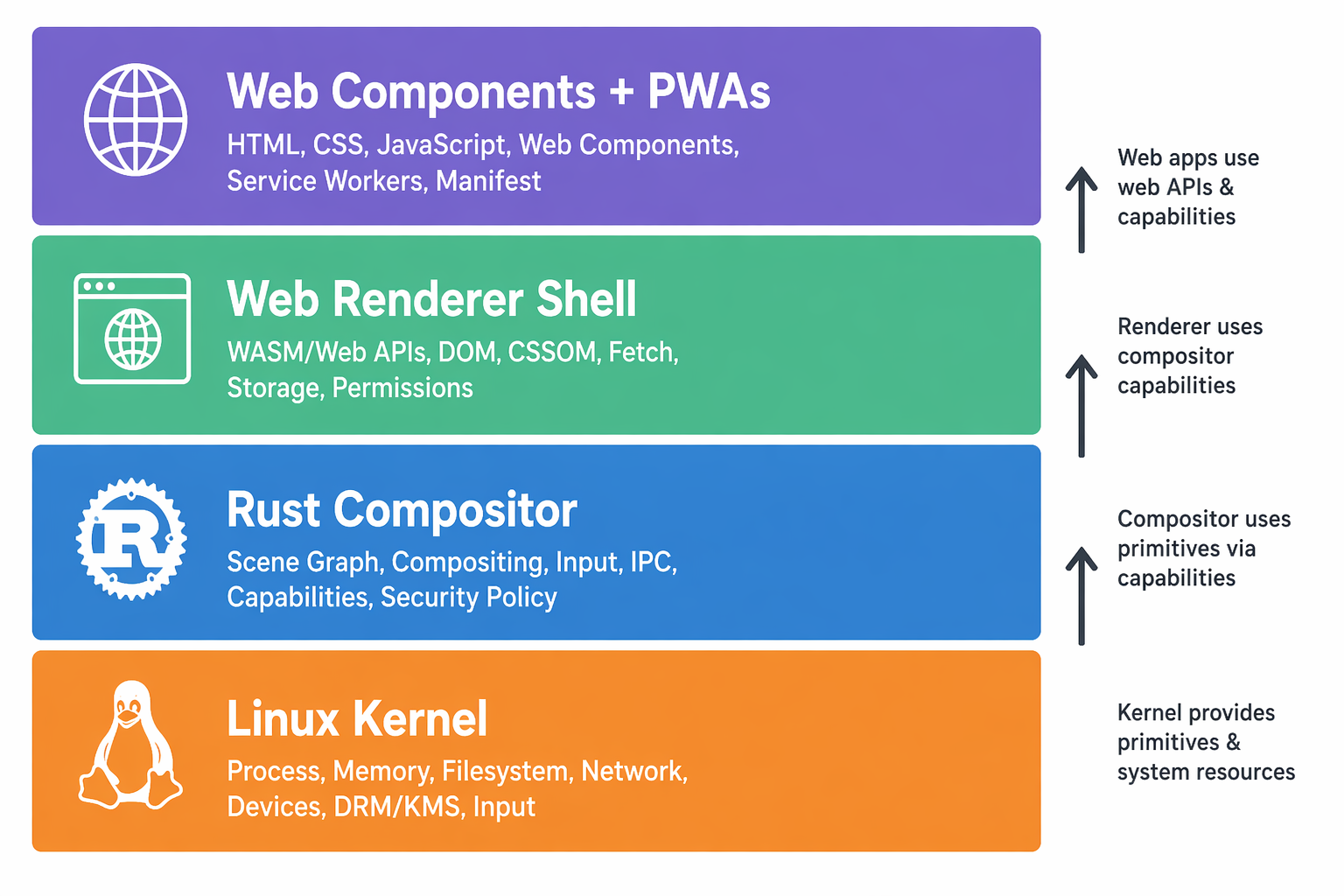
The system is four layers interacting through well-defined interfaces. The key choice: the web renderer is not an app running on the OS — it is the OS surface. Analogous to ChromeOS, without the proprietary Chrome infrastructure.
| Layer | Description |
|---|---|
| Linux Kernel | Mainline Linux. No custom patches. Hardware abstraction, scheduling, drivers. |
| Rust Compositor | Thin Wayland compositor. Display surfaces, input, hardware bridges. Exposes capabilities via IPC. |
| Web Renderer Shell | A web engine runs as the primary shell surface — not inside a window, but as the compositor's display layer. |
| Web Components & PWAs | All user-facing UI. Extensions are web components. Apps are PWAs. Installed by URL, no gatekeeper. |
03 / COMPOSITOR
Rust, Thin on Purpose
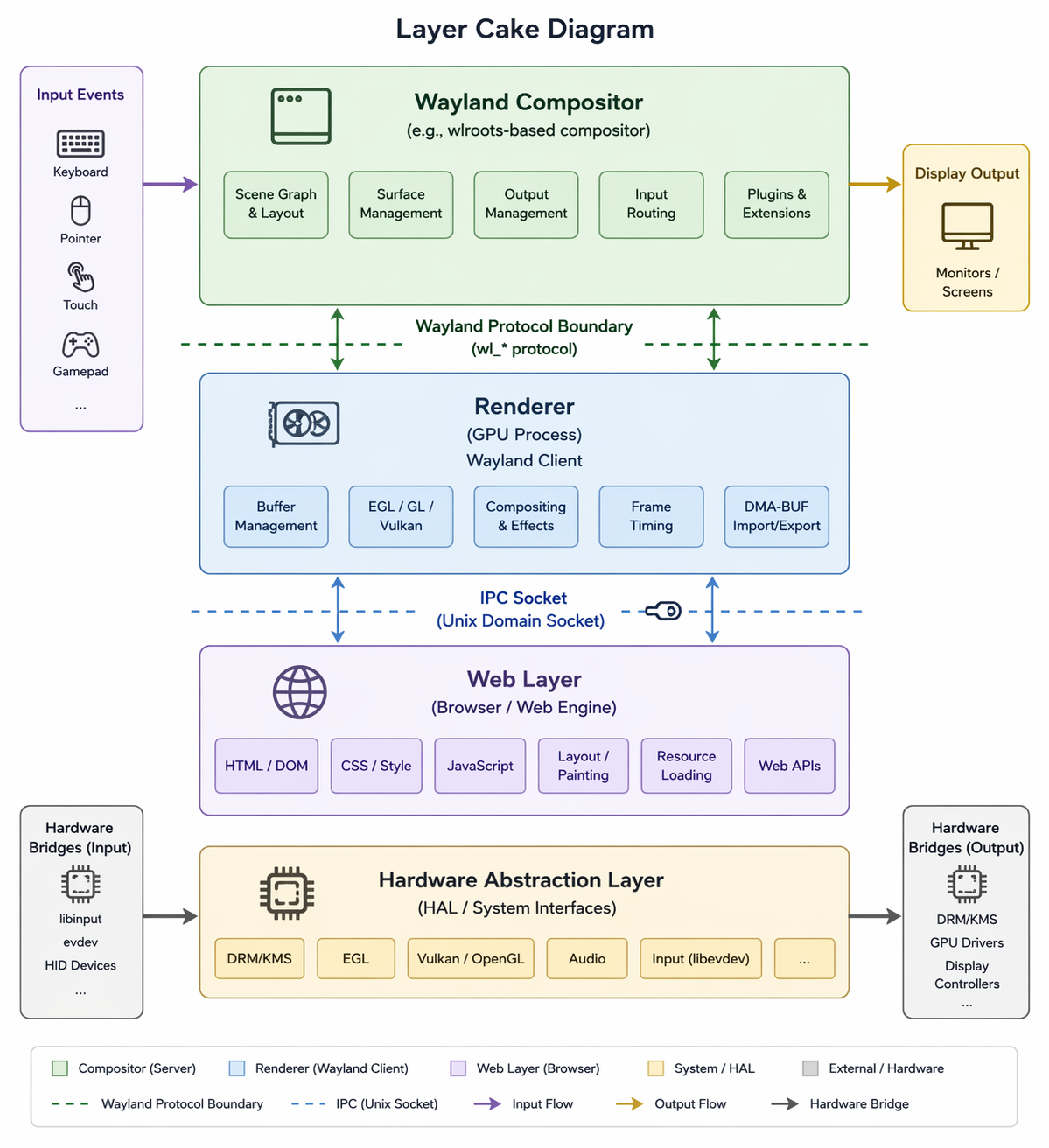
The compositor does exactly three things: own the display, route input, bridge hardware to the web layer. Nothing else. Keeping it dumb and the web layer rich makes the system easier to port, test, and reason about.
Responsibilities
- Wayland surfaces, input events, z-ordering
- Power, connectivity, sensors, audio routing
- Capability IPC over a Unix domain socket
- Inference routing to local daemon or LAN endpoints
Explicitly Not
- No native UI rendering — no GTK, no system chrome
- No app lifecycle management — the shell handles it
- No permission UI — prompts are web components
Technology Choices
Rust for memory safety without a GC at the compositor level. Smithay (pure Rust Wayland) preferred; wlroots bindings as pragmatic fallback. IPC over Unix domain sockets with JSON or Cap'n Proto.
04 / WEB SHELL
Everything You See Is a Web Page
The shell is a collection of standard web components composing the visible interface of the OS. Every UI element is an auditable, replaceable HTML/CSS/JS component.
| Component | Purpose |
|---|---|
<system-launcher> | App grid, search, recents. The home screen. |
<status-bar> | Time, battery, Wi-Fi, BT, notification count. |
<notification-center> | Notification tray, grouped by app. |
<permission-prompt> | Capability grant UI. Declarative, human-readable. |
<lock-screen> | Auth surface. PIN, biometric where available. |
<settings-shell> | Connectivity, display, Inference models, extensions. |
<quick-settings> | Slide-down toggles, brightness, volume. |
Shell API Surface
A small set of JavaScript APIs bridges to the compositor — the
way browsers expose navigator.geolocation. Trusted
shell components only, not arbitrary PWAs.
navigator.system.battery         // battery level + charging state
navigator.system.connectivity    // Wi-Fi, BT, network status
navigator.inference.complete(opts)      // inference routing (see §Inference)
navigator.capabilities.request() // trigger a permission prompt
Theming
CSS custom properties define the theming contract. Any component that respects it is automatically themeable. Themes install by URL, exactly like extensions — no proprietary theming SDK.
05 / APPS + EXTENSIONS
PWAs + URL Extensions
Apps are PWAs. There is no other app format — that's the thesis. Extensions are standard web components installable by URL. No app store, no approval bottleneck, no SDK.
- Any URL is a potential app. Zero-friction distribution.
- PWA APIs are W3C-specified; apps work in any browser.
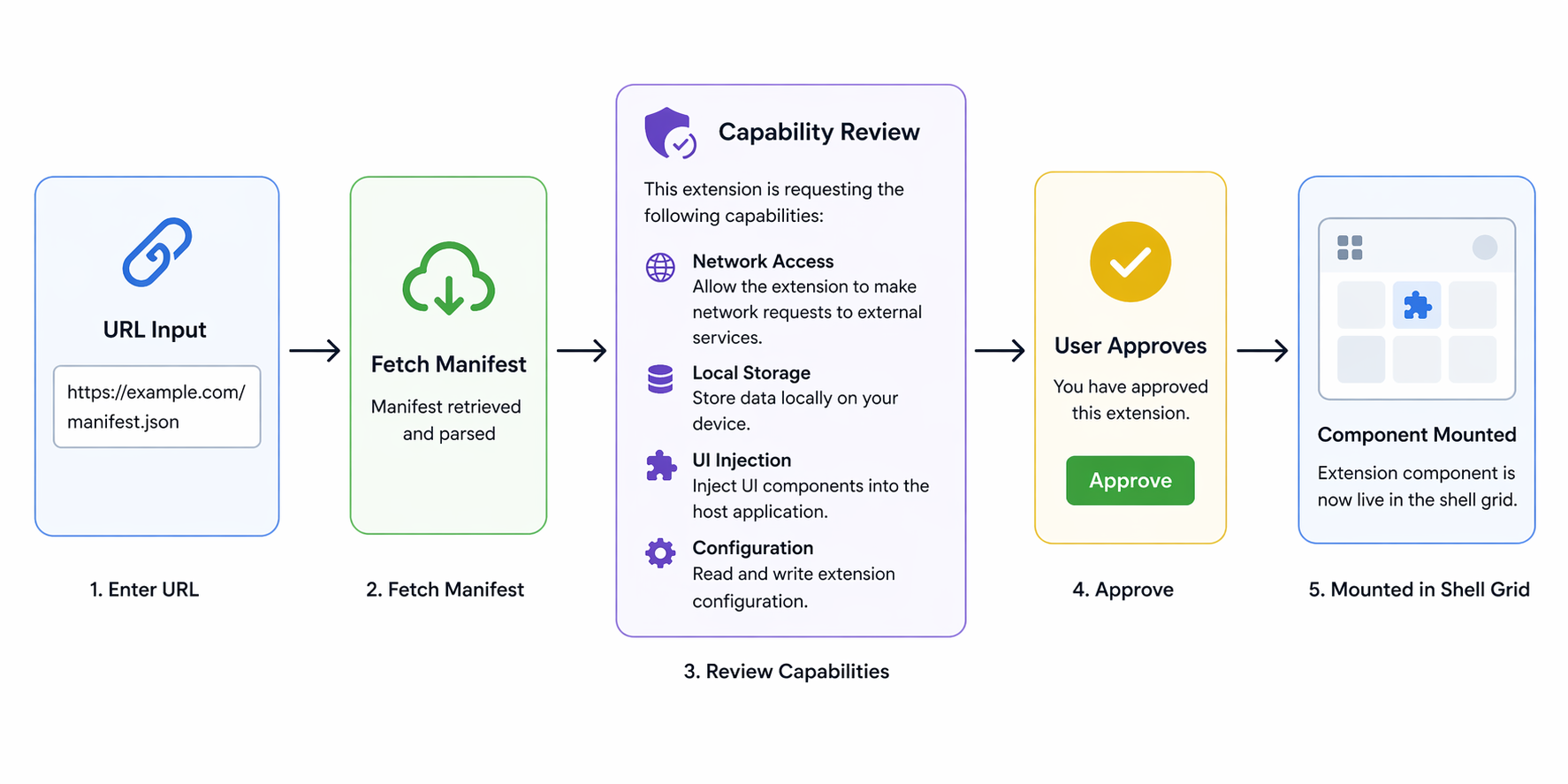
- Install extensions by pointing the OS at a URL.
- Manifest declares capabilities up front.
- User approves before the component mounts into a slot.
- Revocation is instant from settings.
What PWAs Get On This Platform
Because the web renderer is the shell surface, not a sandboxed browser tab, PWAs can hold deeper capabilities than in a conventional browser — always subject to user grant.
| Capability | Notes |
|---|---|
| Persistent background execution | Service workers with fewer artificial constraints. |
| Local Inference | navigator.inference with a capability grant. |
| Cross-app context (read-only) | inference:context:screen, explicit grant. |
| Hardware access | Camera, mic, sensors — capability-gated, never implicit. |
| Full-screen display | System chrome optionally hidden. |
| Filesystem (scoped) | To user-approved directories only. |
Example Extension Manifest
{
  "name": "weather-widget",
  "display_name": "Current Weather",
  "entry": "./weather-widget.js",
  "capabilities": [
    "location:coarse",
    "network:fetch",
    "inference:local"
  ],
  "slots": ["home-screen", "lock-screen"]
}
WHY THIS MATTERS
The extension catalog is the open web. Inference-generated extensions are first-class — "make me a widget that shows my next calendar event as a train departure board" becomes a real user action. A component that works here works in any browser supporting custom elements. The OS cannot trap developers.
06 / PERMISSIONS
Capabilities, Declared Up Front
Permissions are declared in the manifest, not requested at runtime. The prompt is shown once, at install, in plain language. There are no pop-ups during use.
| Capability | Meaning |
|---|---|
location:precise / location:coarse | GPS or approximate location. |
network:fetch | Outbound HTTP requests. |
network:fetch:restricted | Only to manifest-declared domains. |
inference:local | On-device inference — never leaves the device. |
inference:lan | Local network inference endpoints. |
inference:remote | User-configured remote endpoint. |
inference:context:screen | Read current screen content (cross-app, explicit grant). |
inference:context:clipboard | Read clipboard content. |
storage:local | Persistent storage, scoped to the component. |
camera / microphone | Hardware capture devices. |
notifications:push | Send notifications. |
Design Principles
- Additive only. An extension can only do what it declared. It cannot escalate.
- Instant revocation from settings, at any time.
- Inference context never flows sideways. Screen → inference, never app A → app B. This blocks the surveillance model ad platforms depend on.
- The capability list is the audit trail. A reviewer can understand an extension's blast radius at a glance.
07 / INFERENCE
Inference Routing as System Infrastructure
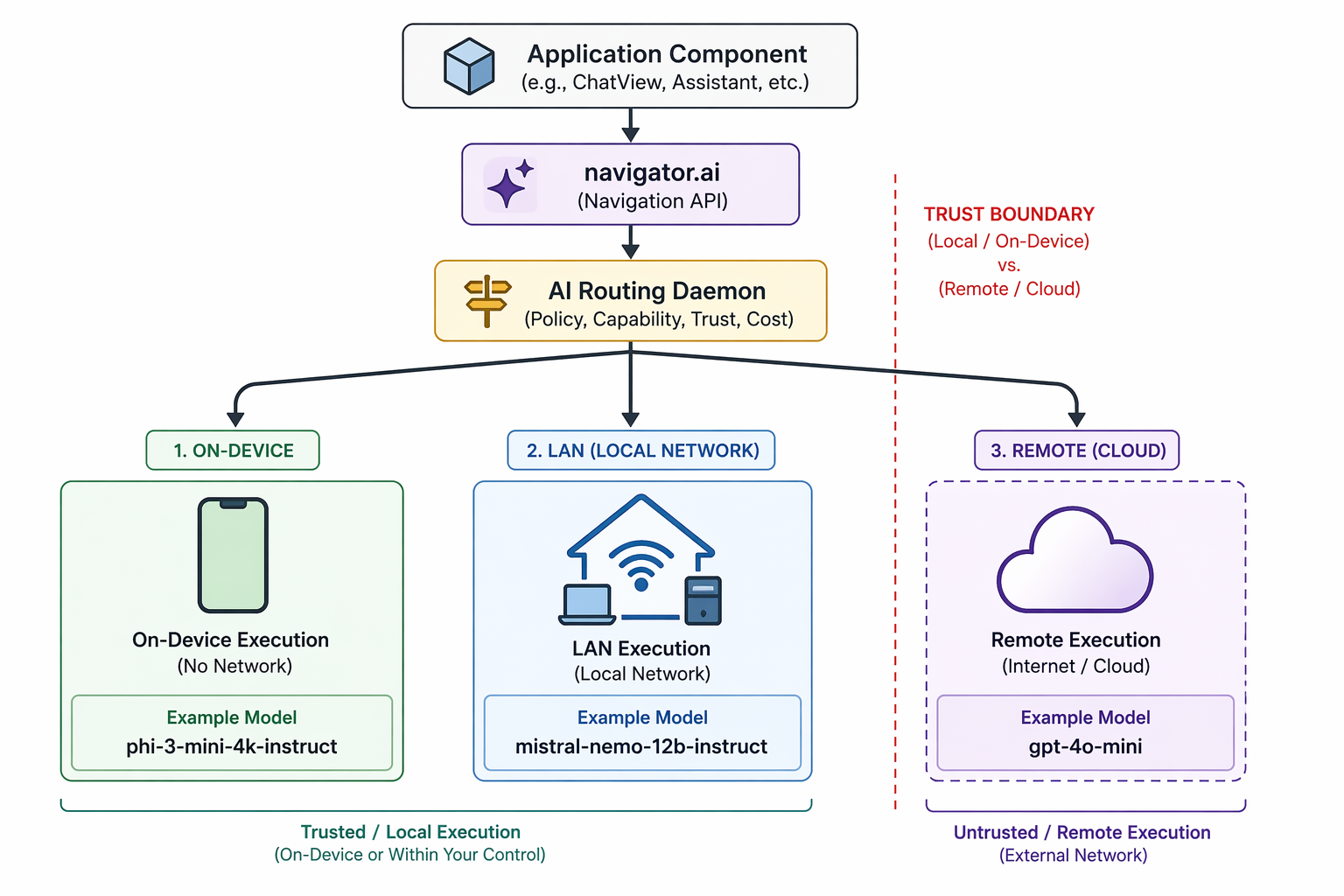
Inference is not an app. It is a system service — like networking or storage — that any component can request, subject to capability grants. What models run, where inference happens, and what data is shared stays entirely in the user's hands.
| Tier | Description |
|---|---|
On-Deviceinference:local |
Quantized models (GGUF) via llama.cpp with Vulkan compute. Works offline. Nothing leaves the device. AMD RDNA2 handles 7B Q4 respectably. |
Local Networkinference:lan |
Home server, NAS, or desktop via mDNS/Avahi. 70B+ models, image generation. Trusted tier — no internet required. |
Remoteinference:remote |
Any OpenAI-compatible endpoint, user-configured. Opt-in only. The OS never phones home by default. |
The navigator.inference API
Intentionally close to the W3C Prompt API proposal — ahead of the curve rather than inventing a proprietary interface.
const result = await navigator.inference.complete({
  prompt: "Summarize the selected text",
  context: ["screen", "clipboard"],  // requires capability grants
  model: "local/preferred"           // routing hint, not hard requirement
});
Model Registry
The system ships a curated model manifest (JSON) listing available models, sizes, capabilities, and sources. The manifest is just a URL. Users can add third-party registries like apt sources. No gatekeeping. Onboarding asks "What do you want Inference to help with?" and recommends based on answers and storage. LAN endpoints (e.g. Ollama) auto-discover via mDNS.
KEY PRINCIPLE
Inference should be a system service, not a platform. Every major OS vendor is currently using Inference as a lock-in vector. This system inverts that: Inference is infrastructure, like networking — open, composable, and replaceable.
08 / HARDWARE
Driver Openness First
Hardware is selected on driver openness first, specs second. The Steam Deck running mainline Linux is the initial target — chosen for driver quality, not TDP. Qualcomm Adreno needs firmware blobs; Mali via Panfrost lags new generations; modems are almost universally proprietary. The Deck sidesteps most of this.
| Component | Notes |
|---|---|
| GPU (AMD RDNA2) | Excellent Mesa/RADV. Vulkan compute for local Inference without ROCm. No firmware blobs for core function. |
| CPU (Zen 2 APU) | x86_64, well-supported by mainline Linux. |
| Input | Physical controls map cleanly to a mobile-ish UI. Touchscreen available. |
| Wi-Fi / BT | Standard peripherals, upstream driver support. |
| Modem / Camera | Explicitly out of scope for v0. Keeps the driver surface tractable. |
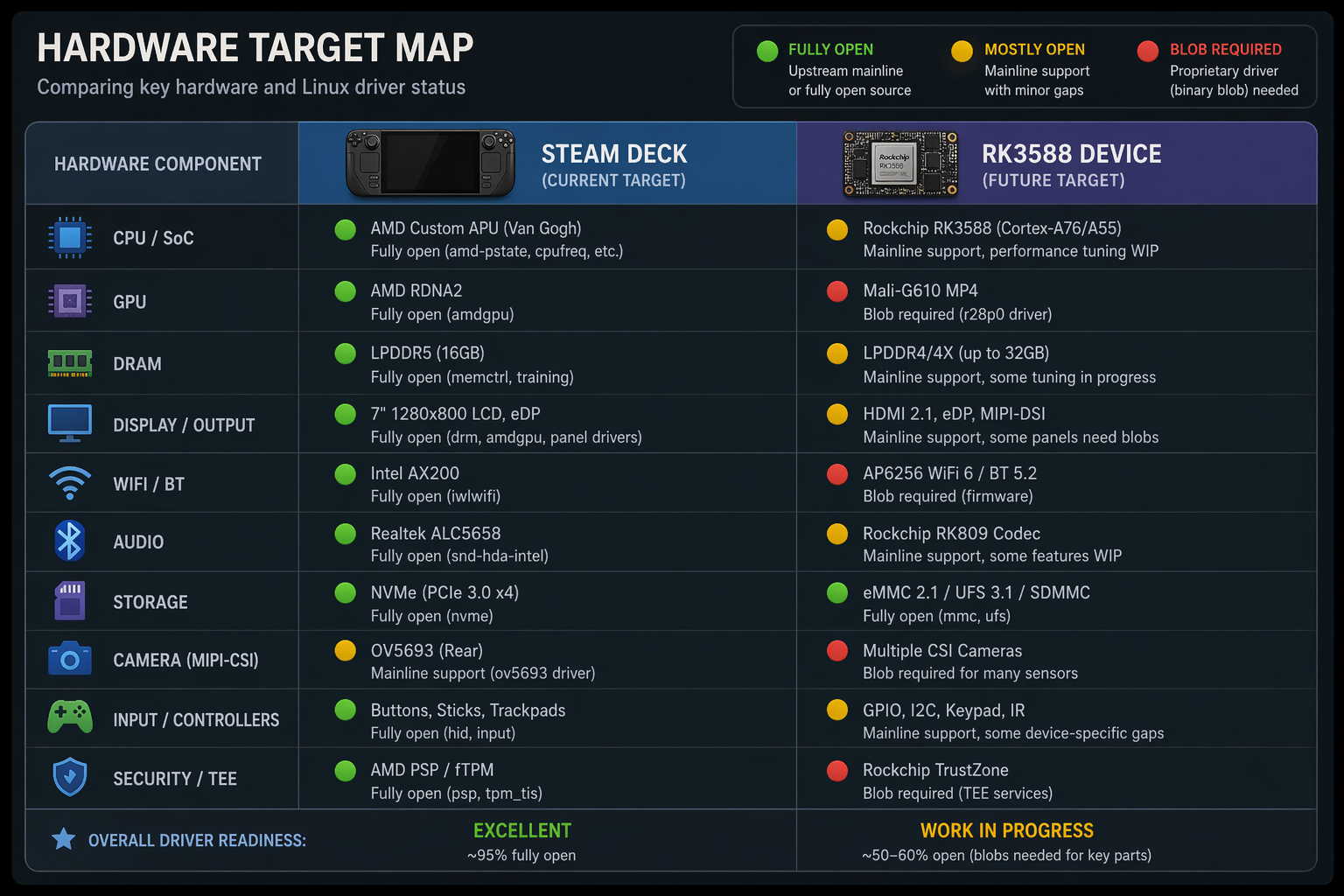
Long-Term: RK3588 ARM Port
Once stable on the Deck, the compositor ports to ARM targeting the RK3588. Its dedicated NPU means on-device Inference has a fast path that doesn't compete with the GPU. The web shell layer ports without significant rework — it's already architecture-independent.
09 / PRIOR ART
What Came Before, And What's Different
| Project | Relationship |
|---|---|
| Firefox OS / B2G (2013–2016) |
Most direct ancestor. Gaia UI was entirely HTML/CSS/JS. Killed by Mozilla for commercial, not technical, reasons. Lesson: distribution and hardware matter as much as architecture. |
| Capyloon | Built by Firefox OS alumni on Gecko. Leans into IPFS and decentralized identity; app model is content-addressed bundles, not URL-installable components. |
| Greenfield | Wayland compositor in HTML5/WASM. Proves "web as compositor" is viable. A proof-of-concept, not a mobile OS. |
| Phosh / postmarketOS | Active, healthy Linux mobile ecosystem. Bets on GTK/GNOME native toolkits — philosophically opposed. Different answer to the same question. |
| ChromeOS | Proves "web renderer as shell" at scale. Entirely proprietary, Google-controlled. Existence proof without the values. |
What Makes This Distinct
No existing project combines all of the following:
- Thin Rust/native compositor — not Gecko, not GTK
- Web renderer as the primary shell surface, not an embedded runtime
- Standard web components as the extension and widget model
- Capability-based, declarative, human-readable permissions
- PWAs installable by URL, no central gatekeeper
- Inference as a system service with local-first, tiered inference routing
10 / DELIVERY
Milestones That Prove the Thesis
Success is a daily driver the author uses. Milestones are ordered to demonstrate the thesis as early as possible — each one is a credible demo, not just a checkpoint.
- M0 — Hello World. Rust compositor running. Web renderer shows a static HTML page fullscreen on the Deck. Days.
- M1 — Web Shell. Status bar, launcher grid, gesture navigation mounted as web components. Weeks.
- M2 — First PWA. A PWA launches, runs, closes, returns to home. Touch works. Weeks.
- M3 — First Extension. A web component installs via URL and appears in the shell. The thesis is proven.
- M4 — Prototype Alpha. Full home screen, Wi-Fi settings, lock screen. Usable day-to-day.
- M5 — Inference Integration. Local model selected at setup.
navigator.inferencelive. Writing assistant as reference extension. - M6 — Daily Driver. Stable as the author's primary device. Extension ecosystem seeded. Developer docs.
SEQUENCING PRINCIPLE
M3 — web component installs via URL, appears in shell — is the moment where the entire architectural thesis is demonstrably true. Everything after M3 is refinement.